
Search with a photo.
Shoppers upload a photo or screenshot, or use the camera. Koral detects the main product and finds it in your catalogue, and a few words narrow the result.
- How shoppers meet it
- On request
- What it needs
- Your feed and the script tag
- Status
- Live on Magasin, Boozt, Kop & Kande and danbolig

From photo to product.
Photo, screenshot or camera
Any image works, from a street photo to a screenshot from social media.
Auto-detect
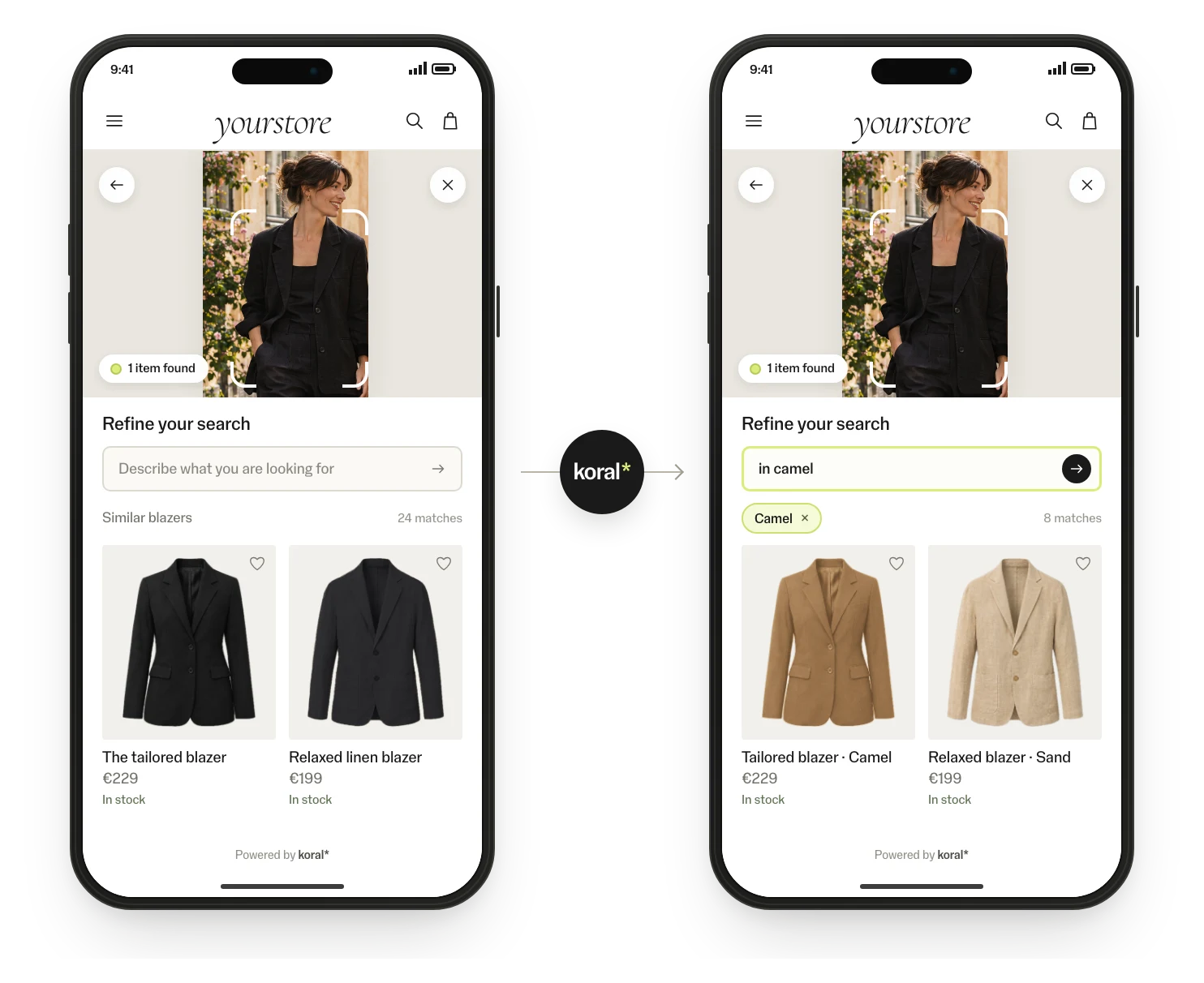
Koral finds the main products in the image and highlights them, so the shopper picks what to search for.
Circle to search
The shopper draws around the item, and the rest of the photo is ignored.
Text refinement
Narrow the result in plain words: “in light blue”, “under €50”.
Inspiration grid
No photo at hand? Shoppers start from curated images in the widget.
Where it sits
In the search bar, on listing pages, on the product page and in your assistant.
See it in action.

On desktop
The image-search panel opens over your store, with upload, inspiration and results in one place.
Refine in words
The shopper adds “in camel”, and the results update without a new photo.
Getting shoppers to use it
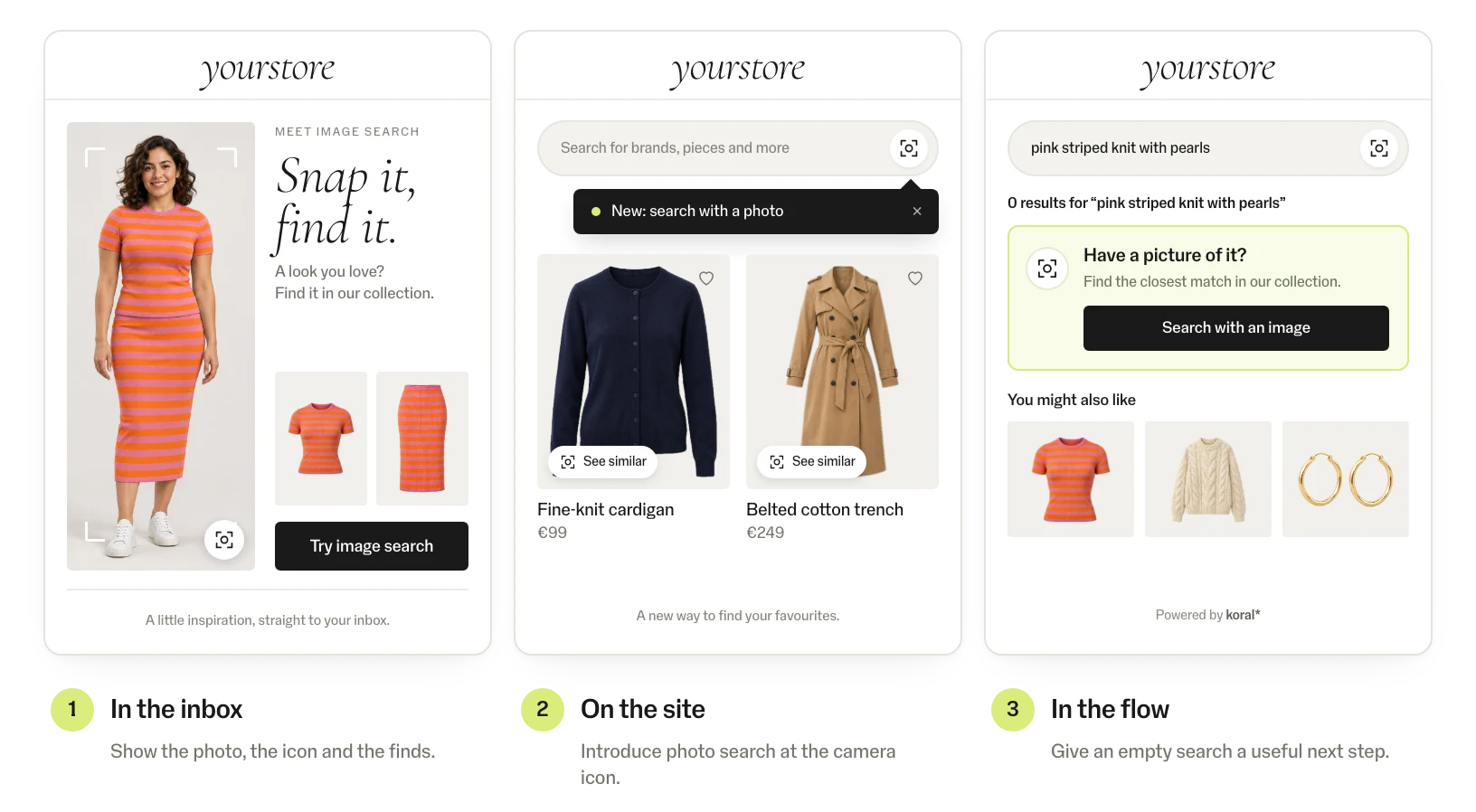
Image search only pays off when shoppers know it exists: a newsletter feature, a tooltip on the camera icon and a photo-search offer on empty results.
Implementation: this is all it takes.
No model to train, no tagging, no CMS work. The product feed is the only input; the rest is one script tag.
<!-- one tag, via GTM or the template -->
<script src="https://script.koral.nu/dist/index.js?searchId=YOUR_SEARCH_ID&his=.search-wrapper .expander&hisi=APPEND"></script>
Widgets are included and take your colours, radius and language. Or render your own components on the same data.
Feed connected
CSV, JSON or your platform feed. Koral indexes every image, in any language and any category.
Tag added
Add the tag through GTM or your template. The widgets come with it, in your colours and language.
Live and measured
Pilot on one category, A/B-split, with events in your analytics. Then roll out market by market.
Good to know.
- Whole catalogue
- Koral reads the product images, so it works for new products and long-tail items from the day they enter the feed.
- Performance
- Sub-second search responses. The tag loads asynchronously after the page, so it doesn’t hold up page load.
- Design
- Widgets take your colours, radius and language, or your team renders its own components on the same data.
- Markets & languages
- Runs on images and the feed, so every market and language in the catalogue works with no per-language setup.
- Analytics
- Views, clicks, add-to-carts and conversions as events in GA or your own stack. Every pilot has an agreed KPI.
- Control
- A rules engine for what shows where: categories, price bands, stock, margins and brand exclusions.
Security and data.
- Nothing is kept
- Koral keeps nothing from shoppers. Photos and data are used for the request and not stored.
- Processed in the EU
- The script is served from a global CDN; requests are processed in the EU.
- Uptime
- 99.9% uptime SLA.
- Data processing agreement
- A data processing agreement (DPA) comes with every contract.
- Your product data
- Product data stays yours; nothing is trained on it.
Questions about data processing? Write to hello@koral.nu. Privacy policy →
Frequently asked questions.
Usually as a camera icon in the search bar. It can also sit in the menu, on content pages or in the app.
They are used only for that search and not stored. Nothing is trained on them, and requests are processed in the EU.
A short on-site nudge on the camera icon and a mention in the newsletter work best, and results without matches offer a photo search.

See Koral on your own catalogue.
Start with a free demo page on your own catalogue, then a one-month pilot at 50% off list prices. All we need is a product feed. Tell us a little about your store. We answer fast.
Thanks — we'll be in touch.
We've got your message. We answer fast.
Prefer email? hello@koral.nu